AI tab
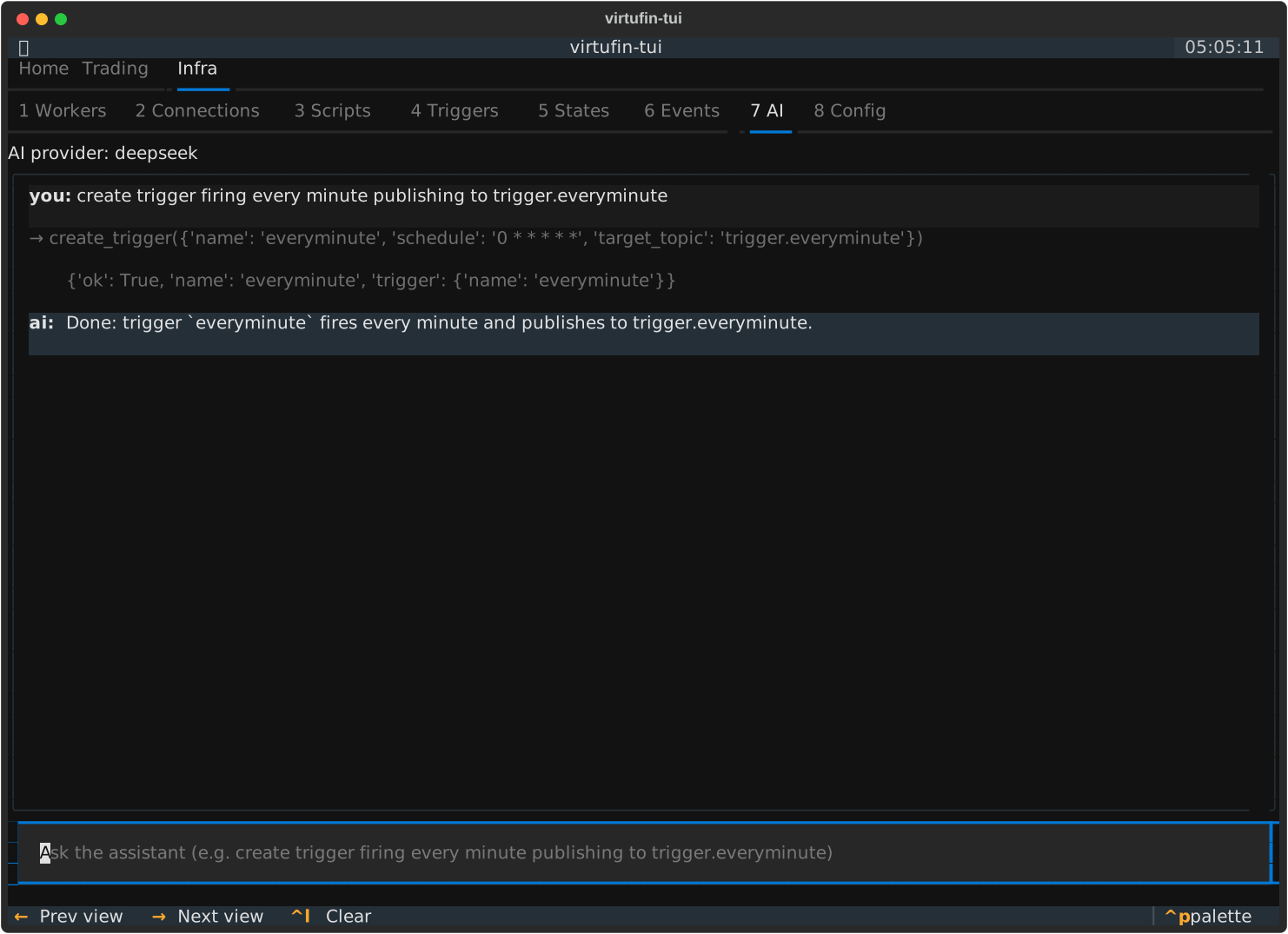
The AI tab is a chat assistant that operates the control plane for you. Type a request in natural language and it calls the right RPCs on your behalf -- creating triggers, subscribing to topics, starting workers, connecting worlds -- the same calls the Triggers / Events / Workers / World pages make.
It appears just before Config under both the Trading and Infra
top-level tabs.
Quick start
-
The
openaiSDK is bundled with the base install — no extra step needed. If you're on an older version,uv pip install 'virtufin-tui[ai]'is the legacy install; current installs just needuv pip install virtufin-tui. -
Set an API key for one of the shipped providers (any one):
- Open the AI tab, type a command, press
Enter:
If no provider is configured yet, the tab shows a "configure" hint and the input is disabled.
Keybindings
| Key | Action |
|---|---|
Enter |
Send the typed message |
Ctrl+L |
Clear the transcript and start a fresh conversation |
P |
Open the provider picker (switch the active LLM provider) |
Providers (llm_providers.toml)
The provider catalog lives at ~/.config/virtufin/tui/llm_providers.toml
(seeded from the shipped default on first run; edit your copy freely). Every
entry is an OpenAI-compatible Chat Completions endpoint -- the openai SDK
is used for all of them, so only base_url / api_key / model differ.
[providers.openai]
base_url    = "https://api.openai.com/v1"
api_key_env = "OPENAI_API_KEY"
model       = "gpt-4o-mini"

[providers.deepseek]
base_url    = "https://api.deepseek.com"
api_key_env = "DEEPSEEK_API_KEY"
model       = "deepseek-v4-flash"

[providers.minimax]
base_url    = "https://api.minimax.io/v1"
api_key_env = "MINIMAX_API_KEY"
model       = "MiniMax-M3"

[providers.ollama]            # local server, no key
base_url = "http://localhost:11434/v1"
model    = "llama3.1"
API key resolution
For each provider, in order:
api_keyset inline in the toml (optional, discouraged for secrets).- The env var named by
api_key_env-- defaults to<NAME>_API_KEY, soDEEPSEEK_API_KEY,MINIMAX_API_KEY, andOPENAI_API_KEYwork with no extra config. - The global
VIRTUFIN_TUI_AI_API_KEYoverride.
Providers with no key (e.g. local Ollama) simply omit api_key / api_key_env.
Which provider is active
Resolution order:
VIRTUFIN_TUI_AI_PROVIDERenv var (explicit session override).- The runtime choice you picked with
P-- this is state, persisted to~/.local/state/virtufin/tui/state.json(default_llm_provider), not the catalog file. The catalog holds only definitions. - The first provider in the catalog (file order) that has a resolvable key.
- None -- the tab shows its "configure" state.
Other env overrides:
VIRTUFIN_TUI_AI_MODEL-- override the model id for the active provider.VIRTUFIN_TUI_AI_API_KEY-- override the key for the active provider.
Adding a custom provider
Add another [providers.<name>] table -- e.g. an internal gateway or a
different hosted model:
[providers.mygateway]
base_url    = "https://llm.internal.example.com/v1"
api_key_env = "MY_GATEWAY_KEY"
model       = "our-finetune"
Then press P in the AI tab to select it (or set VIRTUFIN_TUI_AI_PROVIDER=mygateway).
What it can do
The assistant works through a fixed tool catalog (function-calling). Each tool maps 1:1 to an existing control-plane call -- it has no privileged path:
| Tool | Does |
|---|---|
create_trigger |
Schedule a cron/point-in-time trigger (the Triggers page's a flow) |
delete_trigger |
Delete a trigger by name |
set_event_topics |
Replace the event-stream topic filter (subscribe/unsubscribe) |
create_worker / start_worker / stop_worker |
Worker lifecycle |
add_world / connect_world / remove_world |
World tag/connect/remove |
Each turn, the assistant is given a small state snapshot (active world/scenario, current triggers/topics/workers) so it can use real ids and names instead of guessing. If a model replies with text instead of calling a tool, it is nudged once; if it still doesn't act, its text is shown as a normal chat reply (so models that only half-support tool-calling still work).
Example commands:
create trigger firing every minute publishing to trigger.everyminutesubscribe to sys.workmanager.worker.lifecyclestop worker abc123connect the binance top10 world
Privacy
Each turn sends your message plus the state snapshot (active world/scenario and summaries of current triggers, topics, and workers) to the configured LLM provider. No secrets (API keys, connection credentials) are included in the snapshot. Be aware of this before pointing the tab at a third-party endpoint -- run a local model (Ollama entry) if the control plane's state must not leave the host.
Implementation notes
- Agent logic is Textual-free under
src/virtufin_tui/ai/(config.py,llm_client.py,tools.py,agent.py) so it is unit-tested without a Pilot harness. - The
openaidependency is bundled (a core dependency in the base install). - Anthropic-native and streaming token rendering are not yet supported; any OpenAI-compatible endpoint (including local servers) works today.